


Every Dockerised Django project has an entrypoint.sh, and almost every one of them starts the same way: wait for Postgres, migrate, collectstatic, run gunicorn. It works on a laptop. It works on one VPS.
It fails the day you put a second node behind a load balancer, and it fails in a way that takes hours to diagnose, because four containers running migrate against the same database at the same time do not error politely — they deadlock on DDL locks and raise IntegrityError on seeds that were fine yesterday.
This is the entrypoint we run in production, and the reasoning behind each phase. Two projects are quoted: names.legal, multi-tenant with django-tenants across a fleet, and eniabt.ml, single-tenant on one host. They differ in interesting places.
Phase 1 — wait, but bound the wait
#!/bin/bash
set -e

: ${ENVIRONMENT:="production"}
echo "Running in $ENVIRONMENT environment"

echo "Waiting for PostgreSQL to be ready..."
RETRY_COUNT=0
MAX_RETRIES=60

while ! PGPASSWORD=$POSTGRES_PASSWORD psql -h "$POSTGRES_HOST" -U "$POSTGRES_USER" \
        -d "$POSTGRES_DB" -c '\q' > /dev/null 2>&1; do
  RETRY_COUNT=$((RETRY_COUNT + 1))
  if [ $RETRY_COUNT -ge $MAX_RETRIES ]; then
    echo "Failed to connect to PostgreSQL after $MAX_RETRIES attempts"
    exit 1
  fi
  >&2 echo "Postgres is unavailable - sleeping (attempt $RETRY_COUNT/$MAX_RETRIES)"
  sleep 2
done
echo "Postgres is up"
Four details.
psql -c '\q', not pg_isready. pg_isready tells you the server accepts connections. It does not tell you that this user can reach this database — which is what the application needs, and which fails separately when a password rotates or a database has not been created yet. Connecting and immediately quitting tests the thing you actually depend on.
A bounded loop. MAX_RETRIES=60 at two seconds is two minutes, then the container exits non-zero. The unbounded version — until psql; do sleep 1; done — hangs forever on a typo in POSTGRES_HOST, and a container that hangs looks, to an orchestrator, exactly like a container that is slow to start. It never gets restarted, never gets reported, and sits there.
set -e at the top. Any unhandled failure downstream stops the script instead of continuing into a half-initialised boot.
The attempt counter in the log line. attempt 7/60 tells whoever is reading the logs whether the database is slow or absent. Postgres is unavailable - sleeping, repeated a hundred times with no number, tells them nothing.
Phase 2 — extensions, before migrations
This ordering is not negotiable, and getting it wrong produces an error that names neither extensions nor ordering.
# L'ordre n'est pas négociable : la migration initiale de `recherche` déclare
# une colonne `vector(…)`, et le moteur gis exige `postgis`. Créées après
# `migrate`, elles arrivent trop tard — le premier démarrage échoue sur
# « type "vector" does not exist ».
echo "Initializing PostgreSQL extensions..."
for ext in postgis vector unaccent pg_trgm fuzzystrmatch; do
    if ! PGPASSWORD=$POSTGRES_PASSWORD psql -h "$POSTGRES_HOST" -U "$POSTGRES_USER" \
            -d "$POSTGRES_DB" -c "CREATE EXTENSION IF NOT EXISTS $ext;" > /dev/null; then
        echo "ERROR: extension '$ext' could not be created — migrations will likely fail."
        exit 1
    fi
done
echo "PostgreSQL extensions done."
An initial migration that declares VectorField emits vector(1024) in its CREATE TABLE. If pgvector is not installed at that moment, PostgreSQL says:
django.db.utils.ProgrammingError: type "vector" does not exist
Nothing in that message suggests an extension, an ordering, or an entrypoint. On a first deploy, on a fresh database, at the worst possible time.
Each extension is here for a reason worth writing down next to it:
| Extension | Why |
|---|---|
postgis |
required by django.contrib.gis.db.backends.postgis |
vector |
semantic search (pgvector) |
unaccent |
accent-insensitive search — non-negotiable in French |
pg_trgm |
string similarity, fuzzy matching on names |
fuzzystrmatch |
phonetic matching during imports |
IF NOT EXISTS makes the loop replayable. It runs on every boot, costs a few milliseconds, and repairs a database restored from a dump that did not carry its extensions — which is the normal state of a pg_dump restored into a fresh cluster, and a genuinely common way to lose an afternoon.
The names.legal variant goes further, because PostGIS is several extensions:
init_postgis_db() {
    local db_name=$1
    psql ... -c "CREATE EXTENSION IF NOT EXISTS postgis;"
    psql ... -c "CREATE EXTENSION IF NOT EXISTS postgis_topology;"
    psql ... -c "CREATE EXTENSION IF NOT EXISTS postgis_sfcgal;"
    psql ... -c "CREATE EXTENSION IF NOT EXISTS fuzzystrmatch;"
    psql ... -c "CREATE EXTENSION IF NOT EXISTS address_standardizer;"
}
Phase 3 — assets, and the flag that lets you trust the image
Here is where a single-host script and a fleet script start to diverge.
# Statiques et catalogues i18n : cuits au build de l'image (cf. Dockerfile).
#
# BOOT_ASSETS=auto (défaut) : on les refait quand même au démarrage. C'est
#   indispensable en dev, où le bind-mount `.:/app` recouvre /app/staticfiles
#   et /app/locale par le checkout de l'hôte — donc masque ce que le build a
#   produit.
# BOOT_ASSETS=skip : on fait confiance à l'image. À poser sur les nœuds d'une
#   flotte : démarrage plus court, et surtout tous les nœuds servent les mêmes
#   octets puisqu'ils partent de la même image.
BOOT_ASSETS="${BOOT_ASSETS:-auto}"

if [ "$BOOT_ASSETS" = "skip" ]; then
    echo "BOOT_ASSETS=skip - statics and i18n catalogues come from the image"
else
    echo "Collecting static files..."
    python manage.py collectstatic --noinput \
        || { echo "Failed to collect static files. Exiting."; exit 1; }
fi
The reasoning is the whole point.
collectstatic belongs in the image build: it is deterministic, it depends only on the source tree, and with hashed filenames its output is part of what “this version” means. Running it at boot means every container redoes identical work, and — the part that bites — can produce different bytes, because the boot environment is not the build environment.
But in development the bind-mount .:/app covers /app/staticfiles with the host’s checkout, hiding whatever the build produced. So on a laptop you must re-run it.
One variable, two truths, one image. auto for development and the single VPS (the historical behaviour, so nothing moves); skip on fleet nodes, where the argument for identical bytes across nodes is strongest.
The i18n catalogue has the same shape, and its own failure mode:
if [ -d /app/locale ]; then
    echo "Compiling translations..."
    python manage.py compilemessages --ignore=.venv || echo "Translations: nothing to compile."
fi
Django reads compiled .mo files, never the versioned .po. Skip this and the site stays in its source language whatever the visitor picks — and nothing reports it, because an untranslated string renders as itself, which looks exactly like a site in good order. The -d guard is there so a project without a locale/ directory is not an error.
Phase 4 — the release phase, or: what breaks when you add a second node
This is the section that only exists because we scaled out.
# Trois rôles pilotés par RELEASE_PHASE, même image partout :
#   auto (défaut) : migre + seede puis sert — comportement historique mono-VPS.
#   only          : job de release unique — migre + seede puis s'arrête.
#   skip          : nœud applicatif derrière un job de release — ne touche
#                   jamais au schéma.
RELEASE_PHASE="${RELEASE_PHASE:-auto}"

if [ "$RELEASE_PHASE" = "skip" ]; then
    echo "RELEASE_PHASE=skip - skipping migrations and seeds (handled by the release job)"
else
    ...
fi
The failure this prevents. Four containers start at once on a rolling update. All four run migrate. Django’s migration machinery is not designed for concurrent execution against one database: you get deadlocks on DDL locks, and IntegrityError on idempotent seeds that were fine when one process ran them, because get_or_create is not atomic across four processes racing on a unique index.
django-tenants serialises nothing here. It is not its job.
The fix is a deployment shape rather than a code change: one RELEASE_PHASE=only job runs before the rolling update, and every node runs RELEASE_PHASE=skip. Same image everywhere — that is what makes it workable. The role is an environment variable, so nothing about the artifact changes between the migration job and the application nodes.
auto remains the default, so a single-host deployment and a laptop behave exactly as before. A flag that improves the hard case must not complicate the easy one.
Phase 5 — migrations, in two commands
if [ "$ENVIRONMENT" = "development" ]; then
    echo "Creating any missing migrations..."
    python manage.py makemigrations || { echo "Failed to create migrations. Exiting."; exit 1; }
else
    echo "Production: skipping makemigrations (use committed migrations only)"
fi

echo "Applying shared schema migrations..."
python manage.py migrate_schemas --shared || { ... }

# --shared ne migre QUE le schéma public ; sans cette étape les tables des apps
# de type client manqueraient dans chaque schéma tenant.
echo "Applying tenant schema migrations..."
python manage.py migrate_schemas --tenant || { ... }
makemigrations in development only. A production container that generates migrations generates them from the models it happens to have, writes them into a container filesystem that disappears, and applies them. You now have a database whose schema is not described by anything in version control. The else branch says so out loud in the logs, because silence here reads as an omission.
Two migrate_schemas invocations, and this catches everyone. --shared migrates the public schema only. Tenant-type apps — the client console, billing, appointments, the API — never reach a single tenant schema. The symptom appears on the first customer action, as a missing table, in a schema you have to name to even look at.
Phase 6 — the checks that need a live database
# django_tenants le faisait à chaque `django.setup()`, ce qui rendait TOUT
# démarrage dépendant de la base ; il est déplacé ici, seul endroit où une base
# est garantie. Bloquant : un schéma de tenant qui atterrirait dans
# PG_EXTRA_SEARCH_PATHS ferait fuiter son search_path chez les autres.
echo "Validating PG_EXTRA_SEARCH_PATHS..."
python manage.py check_pg_search_paths || { echo "Invalid PG_EXTRA_SEARCH_PATHS. Exiting."; exit 1; }
django-tenants validates PG_EXTRA_SEARCH_PATHS inside AppConfig.ready(), and that validation opens a cursor — so every django.setup() requires a database. That breaks image builds, and it turns a forty-second Postgres blip into a crash loop across the fleet. We disable it in settings and re-run the identical check here, where a database is guaranteed and where failing is the correct outcome.
The general rule: a check that opens a socket is not a startup check. Move it into the phase that already assumes the world is up.
Note that this one is blocking. A tenant schema leaking into PG_EXTRA_SEARCH_PATHS would put that tenant’s search_path in front of everyone else’s — cross-tenant data exposure. That is worth refusing to deploy over.
Phase 7 — seeding, without leaving a back door
# Essential, non-demo rows every instance needs. Idempotent (get_or_create), so
# it runs on every boot and heals drift without duplicating. Demo seeds
# (seed_realistic_data, …) are intentionally NOT run here.
echo "Seeding base data (seed_base)..."
python manage.py seed_base || echo "Warning: seed_base failed, continuing..."
Two categories, and keeping them apart matters. seed_base is roles and reference lists — rows without which the application does not function. It is idempotent, so running it every boot repairs drift. Demo data is a separate command that production never calls, because the day it does, a customer sees fictional records in their own account.
Note || echo ... continuing: base seeding is not blocking. A reference list that fails to insert should not keep the site down. Contrast with check_pg_search_paths, which is blocking. Each || in an entrypoint is a decision about whether that failure is worse than being offline, and it should be made deliberately, line by line.
Then the superuser:
# Identifiants OBLIGATOIREMENT fournis par l'environnement — aucun mot de passe
# par défaut en dur (plus de admin/admin123). Si le compte n'existe pas et
# qu'aucun mot de passe n'est fourni, on échoue le déploiement plutôt que de
# créer une backdoor.
_su_pass = os.environ.get('DJANGO_SUPERUSER_PASSWORD', '')

if not User.objects.filter(username=_su_name).exists():
    if not _su_pass:
        sys.exit(1)
There was an admin / admin123 in this file once. It was convenient, it was in a private repository, and it was a superuser account with a known password reachable from the internet the moment the first deploy succeeded. Failing the deployment is the correct behaviour: a deploy that stops is a fifteen-minute problem, and an account nobody remembers creating is a permanent one.
The single-tenant project keeps a dev superuser, guarded by ENVIRONMENT = development, which never runs in production.
Phase 8 — the first-run flag
INIT_FLAG="/app/.initialized"

if [ ! -f "$INIT_FLAG" ] || [ "$FORCE_INIT" = "true" ]; then
    echo "=== Running first-time initialization ==="
    ...
    touch "$INIT_FLAG"
else
    echo "Skipping initialization (already done). Set FORCE_INIT=true to re-run."
fi
For work that must happen once and is not idempotent. The FORCE_INIT escape hatch matters more than the flag: without it, re-running a first-time step means finding and deleting a hidden file inside a container, which is exactly the kind of operation that gets done wrong at two in the morning.
One caveat to know: the flag lives on a container filesystem. If that is not a volume, every new container is a first run. Decide which you want — and if the step is expensive, put the flag on a volume; if it is cheap, prefer making it idempotent and delete the flag entirely.
Phase 9 — exec, and the right server
if [ "$ENVIRONMENT" = "production" ]; then
    echo "Starting Daphne ASGI server..."
    exec daphne -b 0.0.0.0 -p 8000 core.asgi:application
else
    echo "Starting Django dev server..."
    exec python manage.py runserver 0.0.0.0:8000
fi
exec is not optional. Without it, the shell stays as PID 1 and the server becomes a child. docker stop sends SIGTERM to PID 1 — the shell — which does not forward it. Ten seconds later Docker sends SIGKILL, and your server is killed mid-request, with no graceful shutdown, on every single deploy. With exec, the server is PID 1 and receives the signal itself.
This is the single most common bug in Django entrypoints, and it is invisible: everything works, deploys succeed, and a few requests die every time.
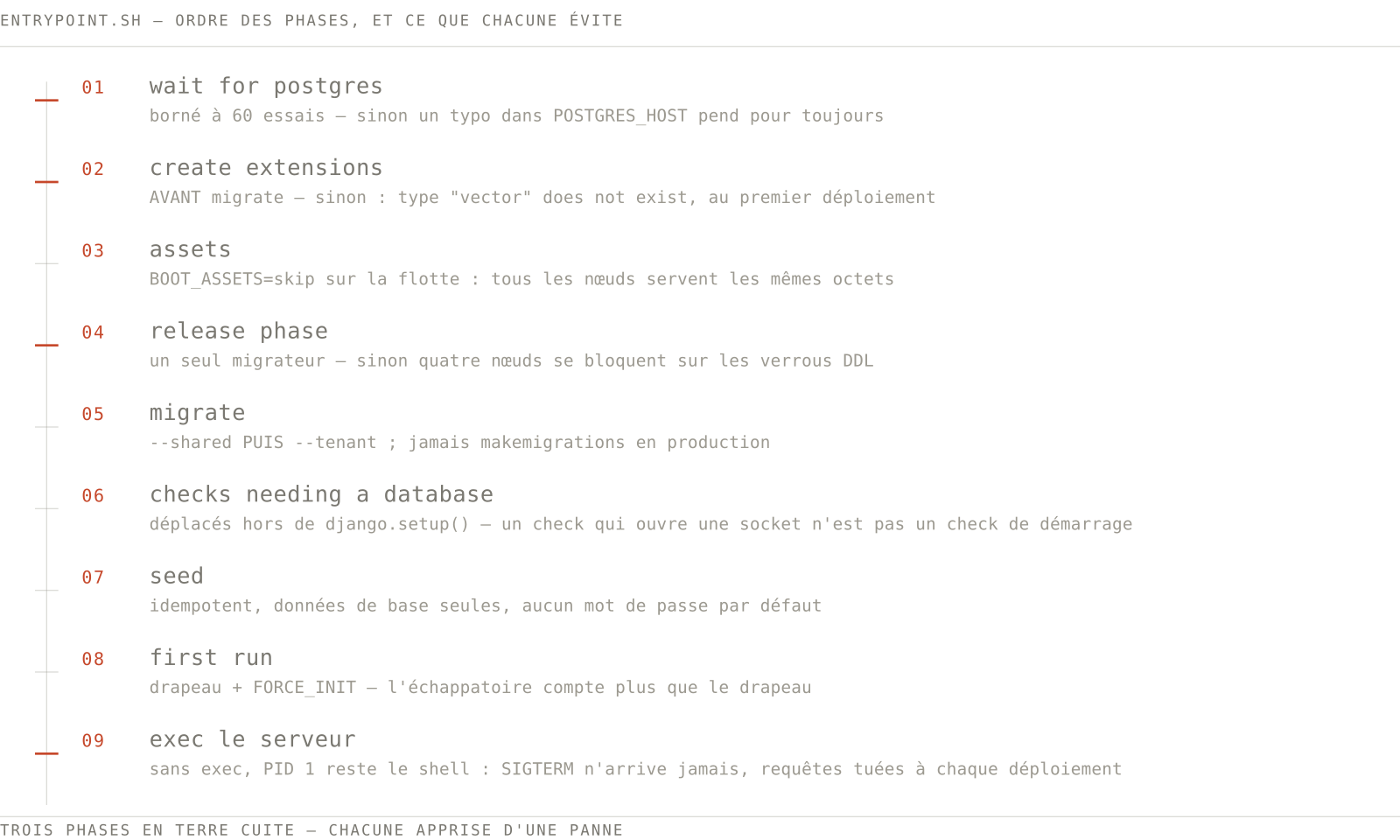
The shape, in nine lines
1. wait for postgres          bounded, as the app's own user
2. create extensions          BEFORE migrations, IF NOT EXISTS
3. assets                     from the image on a fleet, rebuilt in dev
4. release phase              one migrator, or none
5. migrations                 shared, then tenant; never makemigrations in prod
6. checks needing a database  moved out of django.setup()
7. seed                       idempotent, base only, no default password
8. first-run                  flagged, with an escape hatch
9. exec the server            so it gets SIGTERM
Three of these — the extension ordering, the release phase, and exec — were each learned from an outage. The other six are the ones that make those three survivable.